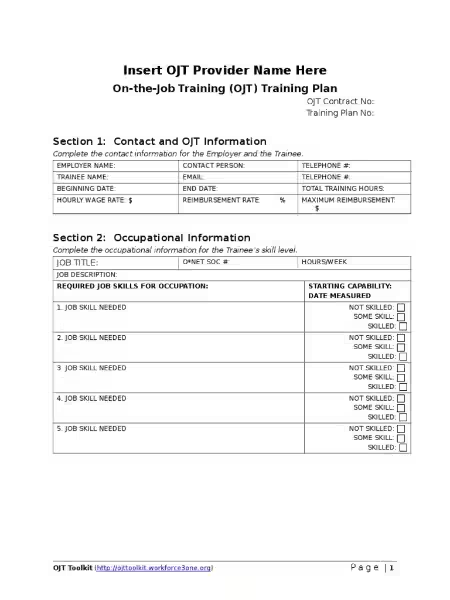
Streamline Your Employee Training: A Must-Have Training Record Template
Streamline Your Employee Training: A Must-Have Training Record Template
Are you tired of juggling spreadsheets and scattered documents to track employee training? Do you need a reliable system to ensure compliance and demonstrate proof of training completion? Then you need a robust and efficient training record template. This article explores the benefits of using a customizable training record template and how it can revolutionize your employee training management.
The Power of a Customizable Training Record Template
A well-designed training record template is more than just a simple form; it's a cornerstone of efficient and compliant employee training management. It provides a centralized location to record all essential training details, eliminating the chaos of scattered information. This ensures easy access to crucial data when needed, simplifying audits and compliance checks.
The benefit of a well-structured document extends beyond mere organization. It ensures that vital training information—employee name, job title, department, dates of training, and specific courses completed—is consistently captured and readily available. This systematic approach minimizes the risk of overlooking critical training updates or failing to comply with regulatory requirements.
Key Features of an Effective Training Record Template
A truly effective training record template offers several key features:
Customizable Fields: The ability to tailor the template to your specific company needs is crucial. This includes adding or removing fields, adjusting formatting, and incorporating your company logo for a professional look.
Automated PDF Generation: The template should automatically generate a polished, printable PDF upon completion, eliminating the need for manual formatting and saving valuable time.
Easy Integration: Seamless integration with popular applications like Google Drive, Airtable, or Slack is essential for streamlining workflows and avoiding duplicative data entry.
Clear and Concise Layout: A user-friendly design ensures that the template is easy to understand and use for both trainers and employees. Complex layouts can hinder efficient data entry and retrieval.
Version Control: The ability to track changes and maintain different versions of the template allows for easy updates and modification as training requirements evolve.
Beyond Record-Keeping: Enhancing Efficiency and Compliance
The advantages of a robust training record template reach far beyond simple record-keeping. It significantly enhances efficiency and compliance in several ways:
Reduced Administrative Burden: Automation reduces the time spent on manual data entry and report generation, freeing up valuable time for other crucial tasks.
Improved Compliance: A well-maintained training record provides verifiable proof of compliance with relevant regulations and industry standards, minimizing the risk of penalties and legal issues.
Enhanced Training Program Effectiveness: Regularly reviewing training records allows you to identify areas for improvement in your training programs and ensure consistent skill development among your employees.
Better Employee Onboarding: The training record provides a clear record of the training each employee has completed, simplifying the onboarding process for new hires.
Streamlined Audits: Having all relevant training data readily available in a well-organized format significantly simplifies audits, reducing stress and improving efficiency during compliance checks.
One size doesn't fit all when it comes to employee training. A truly effective training record template allows for extensive customization. This ensures the template aligns perfectly with your company’s unique structure, training programs, and branding guidelines. Consider these customization options:
Adding Specific Training Modules: Include fields to track completion of specific training modules relevant to your industry or company.
Integrating Company-Specific Information: Add fields for unique employee identifiers, department codes, or other relevant information used within your company.
Custom Branding: Incorporate your company logo, colors, and fonts to create a professional and branded document that reflects your company's identity.
Seamless Integration for a Streamlined Workflow
The ability to integrate your training record template with other applications is a game-changer. This eliminates redundant data entry, minimizes errors, and fosters a more connected workflow. Consider the following integration possibilities:
Cloud Storage: Storing your training records in the cloud (e.g., Google Drive, Dropbox) provides easy access from anywhere and facilitates collaboration among team members.
Project Management Tools: Integration with project management platforms (e.g., Asana, Trello) allows you to track training progress in the context of larger projects.
Communication Platforms: Connecting the template to communication tools (e.g., Slack, Microsoft Teams) allows for quick notification of training completion or upcoming deadlines.
Choosing the Right Training Record Template
When selecting a training record template, consider these factors:
Ease of Use: The template should be intuitive and easy to navigate for all users, regardless of their technical proficiency.
Flexibility and Customization: The template should offer a high degree of customization to meet your specific needs.
Integration Capabilities: Ensure the template integrates seamlessly with your existing systems and applications.
Security and Data Protection: Choose a template that prioritizes the security and privacy of your employee data.
Scalability: The template should be able to accommodate your company's growth and evolving training needs.
By investing in a high-quality, customizable training record template, your organization can significantly improve its employee training management, ensuring compliance, enhancing efficiency, and fostering a culture of continuous learning and development. Don't let disorganized training records hold your business back – embrace the power of efficient record-keeping today.
Training Record Template FAQ
Here are some frequently asked questions about our free, customizable PDF training record template:
What is this training record template?
This is a free, customizable PDF template designed to help you track employee training records efficiently. It provides a verifiable record of completed training for each employee, including details like their name, job title, department, and the specific training courses completed. The template automatically generates a polished, printable PDF for easy distribution and archiving.
What information does the template record?
The template records essential information including employee name, job title, department, and a comprehensive list of completed training courses with dates of completion. You can customize the template to add any other relevant fields your company requires.
How customizable is the template?
The template offers extensive customization options using a drag-and-drop PDF editor. You can add or remove fields, change fonts and colors, and even incorporate your company logo to create a professional and branded document that perfectly matches your company's identity.
How does the template improve workflow efficiency?
Beyond simple record-keeping, the template integrates with popular applications like Google Drive, Airtable, and Slack. This automated data flow eliminates manual data entry, saving time and reducing errors. Your training data is readily accessible across various company applications, streamlining your workflow.
What are the benefits of using this template?
The template offers several key benefits:
Verifiable Training Records: Provides legally sound proof of completed training.
Streamlined Process: Automates PDF generation for easy distribution and archiving.
Customization: Allows for extensive modification to suit your company's specific needs and branding.
Workflow Efficiency: Integrates with popular applications for seamless data transfer.
Compliance: Helps ensure adherence to training requirements.
Cost-Effective: A free and readily available solution.
Yes, the template is designed to be flexible and adaptable to the needs of various organizations, from small businesses to larger enterprises. The customization options ensure it can be tailored to specific requirements regardless of company size.
Does the template provide legal guidance?
The template is a tool for record-keeping and does not constitute legal advice. Always consult with legal professionals to ensure your training programs comply with all applicable regulations.
What if I need to add specific training modules or fields not already included?
The customizable nature of the template allows you to easily add any necessary training modules or fields using the built-in PDF editor. You have complete control over the content and structure of the document.
How do I access and use the template?
[Insert link or instructions on how to access and download the template here]. Instructions for using the editor and integration features will be available upon download.
Is technical expertise required to use this template?
No, the template is designed to be user-friendly and intuitive, even for those without extensive technical skills. The drag-and-drop interface of the PDF editor makes customization simple and straightforward.
What file formats are supported?
The template is a PDF, and the generated output is also a PDF. Integration with other applications allows for data transfer in various formats depending on the application's capabilities (e.g., CSV, JSON).
What if I encounter problems using the template?
[Insert instructions on how to get support or access troubleshooting resources here]. We strive to provide a seamless user experience and are available to assist you with any issues you may encounter.