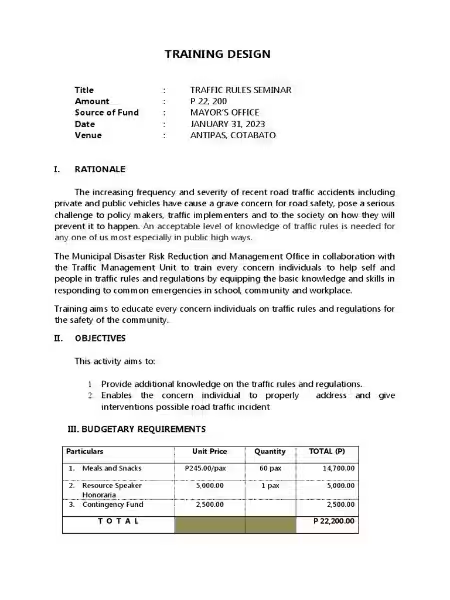
Streamlining Training with Efficient Training Forms
Streamlining Training with Efficient Training Forms
Choosing the right tools can significantly impact the success of your training programs. Effective training isn't just about delivering the content; it's about managing the entire process efficiently. This includes registering participants, evaluating the training's impact, and assessing participant learning. This is where the strategic use of training forms becomes crucial.
Well-designed training forms are the backbone of a smooth and effective training program. They provide a structured way to collect vital information, allowing you to track participants, gather feedback, and measure the effectiveness of your training initiatives. Instead of relying on disparate spreadsheets or manual methods, using a centralized system for creating and managing these forms simplifies the entire process.
The advantages are numerous. Imagine effortlessly registering participants, collecting detailed feedback on various aspects of the training, and quickly assessing participant knowledge retention, all within a single, manageable system. This streamlined approach allows you to focus on delivering high-quality training, rather than getting bogged down in administrative tasks.
Key Form Types for Training Programs
Several key form types are essential for comprehensive training program management. These include:
Registration Forms: These forms capture crucial participant details like name, contact information, company affiliation, and any specific training interests or prerequisites. This ensures accurate participant tracking and allows for personalized communication.
Evaluation Forms: These are crucial for measuring the effectiveness of your training. They employ various question types—multiple choice, rating scales (like Likert scales), and open-ended questions—to gather feedback on instructor performance, content relevance, material clarity, and the overall learning experience. The data collected informs continuous improvement.
Quizzing Forms: These forms assess participant learning and knowledge retention. They can incorporate a range of question formats, from simple multiple-choice and true/false to more complex question types depending on the complexity of the training. Automated scoring features can provide immediate feedback to both participants and instructors, highlighting areas needing further clarification or instruction.
Utilizing a User-Friendly Platform for Training Form Creation
Creating and managing training forms shouldn't be a technical hurdle. The ideal platform offers a user-friendly interface, allowing both technically proficient and less tech-savvy users to easily create and customize forms without extensive technical knowledge. A drag-and-drop interface is particularly beneficial, making form creation intuitive and efficient.
This ease of use translates to significant time savings. You can quickly adapt forms to specific training scenarios and objectives without needing specialized coding skills. The ability to easily customize elements like adding fields for names, email addresses, course selections, rating scales, multiple-choice questions, and text fields ensures that your forms precisely capture the information you need.
Beyond the Basics: Advanced Features
While core functionality is crucial, advanced features can significantly enhance the effectiveness of your training forms. Consider platforms that offer:
Integration with payment gateways: This allows for seamless fee collection during registration.
Customization options: Align the form's design with your branding for a professional look.
Automation features: Automate tasks like sending email confirmations and reminders.
Data analysis tools: Easily monitor, filter, and export the data collected through your forms for comprehensive analysis and reporting.
Conclusion: Choosing the Right Tools for Training Success
The use of well-designed training forms is paramount for successful training program management. By leveraging a user-friendly platform with customizable templates and advanced features, you can streamline the entire training process, from participant registration to evaluation and assessment. This ultimately leads to more efficient and effective training initiatives, resulting in improved knowledge retention and better overall outcomes. Investing in the right tools for managing your training forms is an investment in the success of your training programs.
Here's an FAQ section about training forms based on the provided information, avoiding mention of any specific platform like "123FormBuilder" to prevent any unintentional implication of endorsement or plagiarism of their specific features:
Frequently Asked Questions about Training Forms
What are training forms used for?
Training forms streamline the entire training process, from registration and participant tracking to evaluating the effectiveness of the training and assessing participant learning. They help gather essential information, provide feedback mechanisms, and track progress, ultimately improving the efficiency and impact of training programs.
What types of training forms are available?
A variety of forms can be created to suit different training needs. These typically include registration forms to collect participant details, evaluation forms to gather feedback on the training experience, and quizzing forms to assess participant knowledge and understanding. Additional forms might include pre-training needs assessments, post-training surveys, or feedback focusing on specific aspects of the training material.
What information is typically collected in a training registration form?
Registration forms usually collect essential participant information such as name, contact details, company affiliation (if applicable), and potentially specific training interests or prerequisites. This ensures accurate participant tracking and enables tailored communication.
How are evaluation forms used to improve training?
Evaluation forms employ various question types – multiple choice, rating scales, and open-ended questions – to gather feedback on aspects like instructor performance, content relevance, material clarity, and the overall learning experience. This data provides valuable insights for improving the training's content and delivery.
What are the benefits of using quizzing forms in training?
Quizzing forms assess participant learning and knowledge retention. They might incorporate multiple-choice, true/false, or more complex question types depending on the training's complexity. Automated scoring features can provide immediate feedback to participants and instructors, aiding in identifying areas needing further clarification or instruction.
How easy are these training forms to create and customize?
The forms are designed for ease of use. A user-friendly interface allows for effortless form creation and customization, requiring no advanced technical skills. This drag-and-drop functionality enables tailoring forms to meet the precise requirements of any specific training program.
Can these training forms be used for various types of training programs?
Yes, the forms are adaptable and can be used across a wide range of training scenarios and objectives. Whether it's employee onboarding, professional development, or specialized skill training, the flexibility of the forms ensures they can effectively support diverse training needs.
What happens to the data collected through these forms?
The collected data provides valuable insights into participant engagement, training effectiveness, and areas for improvement. This data can be analyzed to enhance future training sessions and better meet the needs of participants. The specific method of data storage and handling would depend on the chosen system or platform used to create and manage the forms.